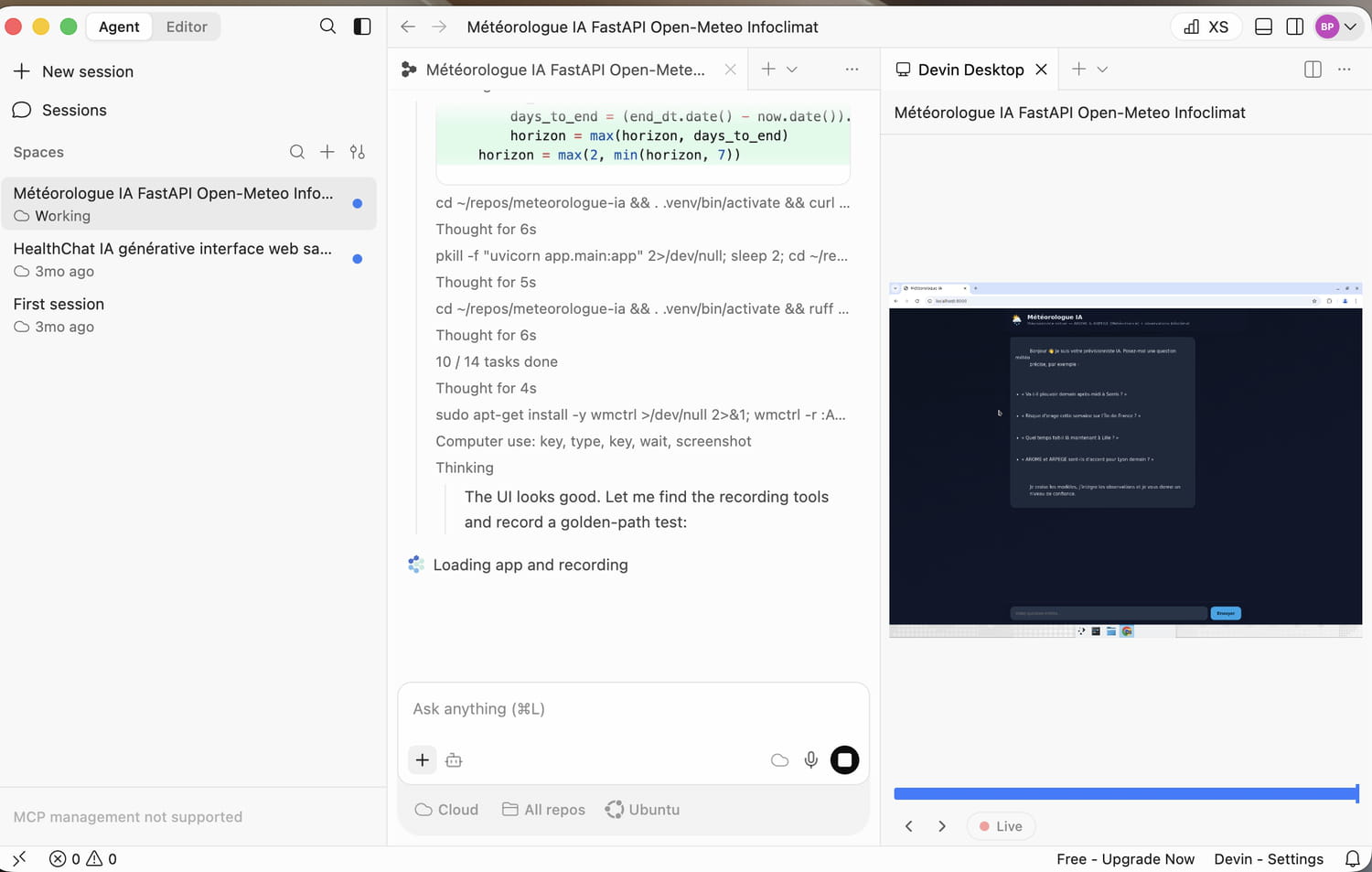
Cognition has merged Windsurf and Devin into a new interface designed to control several code agents at once. The JDN tested this promise of autonomy, attractive but seriously competitive.
Windsurf is dead, long live Devin Desktop. Since the beginning of June, Windsurf, the agentic code IDE developed by Cognition, has been merged with Devin under the name Devin Desktop. The application, available on Mac, Windows and Linux, allows you to create and manage autonomous code agents from a Kanban interface. We had already tested the Devin AI in April: it was positioned as an even more autonomous alternative to the classic CLI code agents on the market (/goal did not yet exist) such as Claude Code, Codex and Gemini CLI. Does this new version of Windsurf include these capabilities? Autonomy, user experience, price… JDN has tested it for you.
The real difference of Devin Desktop
The real difference of Devin Desktop does not lie in its code generation capabilities, now quite close to those of the best agents on the market, but in the way of controlling them. The application replaces the traditional conversation panel with a real command center organized in the form of a kanban board. Each task entrusted to an agent appears in a column according to its status: in progress (running), blocked (blocked) or completed (ready). It is thus possible to launch several jobs in parallel, monitor their progress and intervene only when human validation is necessary.
Cognition takes this logic a step further with Agent Client Protocol, or ACP. The open protocol allows exchanges between Devin Desktop and code agents. Concretely, the agent command center is not reserved for Devin: it can also accommodate Codex CLI, Claude, Gemini CLI, OpenCode or even your own agent. All can then be launched and supervised from the same interface. Devin Desktop is almost closer to a universal code agent orchestrator than a true IDE.
By default, the application allows you to select three different code agents:
The first, Cascadeis the old Windsurf code agent, still integrated into the IDE today. The agent basically works with a single context window and in a sequential manner. It is possible to choose from the list of models supported by Devin to run the agent. It will most certainly be removed in the coming months.
The second, Local Divineris the new default agent for Devin Desktop. Unlike Cascade, the agent can launch sub-agents and its harness is much better optimized for tasks requiring great autonomy. The agent is sandboxed locally on your computer.
Devin Cloud is the most autonomous agent. It selects the best available model at each turn and designs your application in a virtualized environment (Ubuntu or Windows) in the cloud, in complete autonomy. The code is hosted on a GitHub repo. It is the most autonomous agent and the most suited to software engineering tasks, in our opinion.
The JDN test
To quickly test Devin’s capabilities, we will ask him to create a weather chatbot, connected in real time to all the data from current and future weather stations. The goal: to be able to question the chatbot on any weather question and for it to be able to respond with the greatest precision, based on raw models from Météo-France (Arome, Arpège in particular). We will use Devin Cloud for this project, for its autonomy capabilities.
We simply give the following prompt to Devin Cloud:
OBJECTIF

Construis une application web de chatbot "météorologue IA" en français.

Critère central : le bot ne doit JAMAIS se limiter à restituer une prévision brute

("demain 22°C, risque de pluie"). Il doit raisonner comme un prévisionniste

professionnel : croiser plusieurs modèles numériques, évaluer leur accord ou leur

divergence, intégrer les observations en temps réel, expliquer la situation

synoptique sous-jacente, et toujours assortir sa réponse d'un niveau de confiance.

Si deux modèles divergent, il doit le dire et expliquer pourquoi.

STACK

- Backend : Python + FastAPI.

- Frontend : interface de chat web simple et propre (une seule page suffit).

- LLM : API OpenAI, clé fournie via la variable d'environnement OPENAI_API_KEY.

  Modèle à utiliser : GPT-5.5

  Ne hardcode jamais la clé, lis-la dans l'environnement.

SOURCES DE DONNÉES (temps réel, à connecter toi-même via leurs docs)

1. Prévisions — Open-Meteo, endpoint Météo-France (modèles AROME et ARPEGE).

   Doc : https://open-meteo.com/en/docs/meteofrance-api

   - Utilise au minimum arome_france_hd (haute résolution ~1.3 km, courte échéance)

     ET arpege_europe (moyenne échéance).

   - Récupère par échéance horaire : température 2m, précipitations + probabilité,

     vent et rafales 10m, couverture nuageuse, pression au niveau mer, humidité

     relative, CAPE si exposé.

   - Pas de clé requise.

   - Géocodage ville -> lat/lon via l'API geocoding gratuite d'Open-Meteo.

2. Observations — Infoclimat, réseau de stations temps réel.

   Doc : https://www.infoclimat.fr/public-api/

   - Lis la doc pour le format exact et la gestion du token. Si un token est

     nécessaire, expose-le aussi en variable d'environnement.

   - Sert au nowcasting et à confronter les modèles à la réalité observée.

CŒUR DU PRODUIT : la couche "météorologue"

Le pipeline pour chaque question utilisateur :

1. Identifier la localisation et l'échéance demandées.

2. Récupérer en parallèle AROME, ARPEGE (prévisions) et Infoclimat (obs récentes).

3. Construire un bloc de données structuré (JSON) que tu passes au LLM.

4. Le system prompt du LLM doit imposer le rôle de prévisionniste et exiger :

   - comparaison explicite AROME vs ARPEGE (accord = confiance haute ;

     divergence = signaler l'incertitude et la fourchette) ;

   - prise en compte des observations Infoclimat pour caler le point de départ ;

   - explication du "pourquoi" météo (flux, front, anticyclone, instabilité…)

     quand c'est pertinent ;

   - rappel des limites des modèles (AROME pertinent surtout à courte échéance,

     ARPEGE au-delà ; fiabilité décroissante avec l'échéance) ;

   - niveau de confiance explicite (élevé / modéré / faible) ;

   - interdiction stricte d'inventer une donnée : si une donnée manque, le dire.

CRITÈRES D'ACCEPTATION (teste-les toi-même avant de me livrer)

- "Va-t-il pleuvoir demain après-midi à Serris ?" -> réponse nuancée citant

  les deux modèles et un niveau de confiance.

- "Risque d'orage cette semaine sur l'Île-de-France ?" -> exploite CAPE et

  signale l'incertitude liée à l'échéance.

- "Quel temps fait-il là maintenant à Lille ?" -> s'appuie sur l'observation

  Infoclimat, pas sur la prévision.

- "AROME et ARPEGE sont-ils d'accord pour Lyon demain ?" -> comparaison directe.

LIVRABLE

Repo GitHub avec README : installation, variables d'environnement attendues

(OPENAI_API_KEY, token Infoclimat si requis), commande de lancement.

L'app doit tourner en local sans modification de code après avoir renseigné les clés.
The agent works around 30 minutes in total and delivers a production ready interface. Although very minimalist, it is fully functional. The data reported is reliable and makes it possible to establish a precise weather forecast. The session consumed approximately 46 of our Pro plan daily quota. A considerable consumption which does not allow you to work calmly on a project for several hours. For use beyond discovery, higher planes are inevitable (read below).
For the most curious, the code is available on GitHub: https://github.com/BenjaminPolge/meteorologue-ia
Attractive pricing, no more ACUs
On paper, Devin Desktop displays a particularly attractive price. The Pro plan starts at just $20 per month and provides access to the most advanced models from OpenAI, Anthropic and Google, as well as Devin Cloud. Cognition has mainly abandoned ACUs, these opaque and difficult to anticipate calculation units that we criticized during our previous test. The operation by daily and weekly quota is much more readable: the user immediately sees the portion of his envelope consumed, without having to convert each action into abstract credits.
This apparent accessibility must, however, be put into perspective. Our only test, completed in around thirty minutes, consumed almost half of the daily quota of the Pro offer. At $20 per month, Devin Desktop is therefore especially suitable for one-off personal projects, for example to quickly develop a small application over a weekend. When working with multiple agents on a daily basis, patching an existing product, or conducting sessions lasting several hours, the limit will be reached far too quickly. In our opinion, true individual professional use requires moving directly to the Max offer billed at $200 per month.
Devin Desktop nonetheless remains an excellent code agent, capable of quickly delivering functional applications with very little human intervention. However, Devin’s historical stomping ground is seriously beginning to shrink. With the arrival of advanced autonomy loops like /goal at Codex and Claude Code, Devin Cloud stands out much less clearly than a few months ago. Its kanban interface and its multi-agent approach remain attractive, but they are no longer enough to justify its positioning and its price alone. We will now have to observe how Cognition will evolve the product to recreate a real competitive advantage. The merger between Windsurf and Devin is, after all, only a few weeks old.